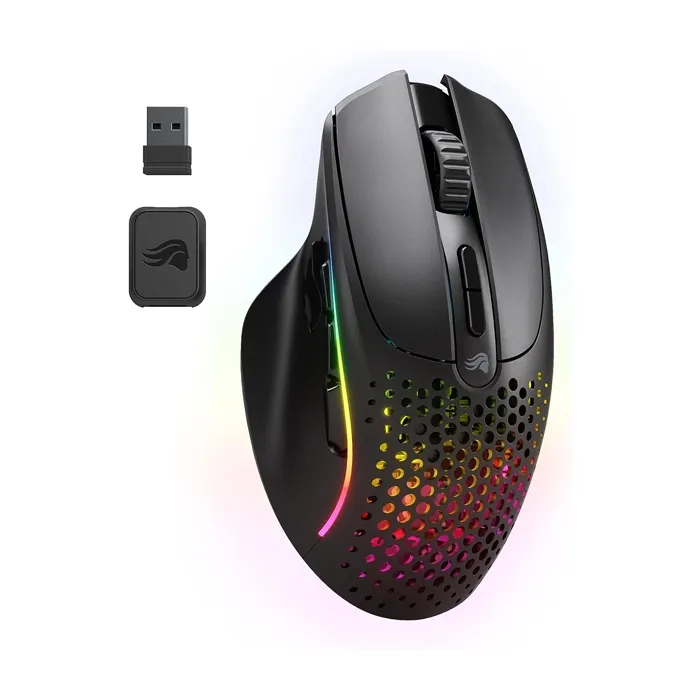
Glorious Model I 2 Wireless Ultralight Ergonomic Gaming Mouse - Matte Black

KWD 39.90
In stock
SKU
34954

Store Availability

Alfuhod Al Rai Branch
Out of Stock
Qty 0
Alfuhod Al-Qurain Branch
Out of Stock
Qty 0
Alfuhod Jahara Branch
Out of Stock
Qty 0
Alfuhod Sabah Salem Branch
Out of Stock
Qty 0
KIB instalment starting from KWD 3.32 /Month
Read More

To proceed your order with KIB Instalment total cart amount should be above 300 KWD.

The most comfortable ultralight wireless mouse, packed with next-gen tech in a modular ergonomic design. 9 programmable buttons with customizable side controls make it ideal for Battle Royale, MOBA, MMO and FPS games.

  • Ultralight 75-gram weight
  • Contoured ergonomic shape
  • 9 programmable buttons
  • Swappable magnetic side buttons

What's in the box

• 1× Glorious Gaming Mouse
• 1× USB Receiver
• 1× Ascended USB-A to USB-C Cable

• 1× USB-A to USB-C Adapter
• 7× Magnetic Side Buttons
• 1× Side Button Remover

System Requirements
• Available USB port
• Windows 7+, Mac OS, Linux


We recommend fully charging your Model I 2 Wireless before using it for the first time in wireless mode. Plug the USB-A end of the Ascended cord into your PC and the USB-C end into the USB-C port located on the front of the mouse.

The mouse can be used normally in wired mode.

The total charge time from zero to full battery is approximately 2 hours.

Wireless USB Reciever: Once the mouse is fully charged, toggle the switch at the bottom of the mouse to “2.4” and plug the USB receiver into your PC. The receiver is paired with the mouse out of the box and should be kept at close range for optimal performance.
Wireless Bluetooth: Once the mouse is fully charged, toggle the switch at the bottom of the mouse to “BT.” Press and hold DPI+ (button 7), Home (side button 4), and Forward (side button 5) until the LEDs flash blue to indicate that the mouse is discoverable. The mouse will show as “Model I 2” on your PC. Follow the instructions on your PC to successfully pair the mouse via Bluetooth. Once successfully paired, the mouse will discontinue flashing blue and revert to its previous lighting effect.

Bluetooth connectivity requires a PC with built-in Bluetooth or an external Bluetooth adapter (purchased elsewhere).

All Glorious mice come with blue protective film on the G-Skates feet in order to protect them. Ensure you remove these coverings before use.

More Information
Product Name Glorious Model I 2 Wireless Ultralight Ergonomic Gaming Mouse - Matte Black
Brand Glorious
Weight 0.500000
Warranty 1 Year Warranty
Write Your Own Review
Only registered users can write reviews. Please Sign in or create an account
2022-26 Alfuhod Net for Computers